Cartoon Unicorn Name Sign SVG Cut File: A Magical Design Asset
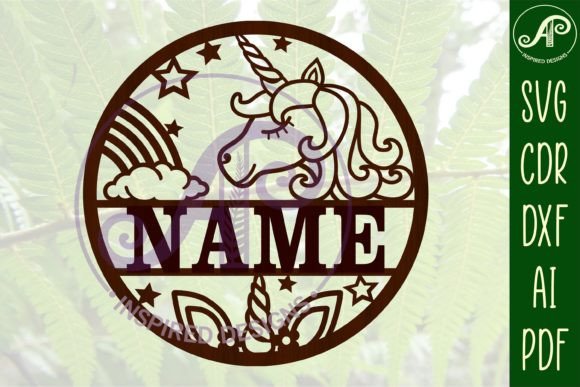
Imagine transforming a child's room door, a nursery wall, or a party backdrop into a personalized fairy tale scene with a single, enchanting design. The Cartoon Unicorn Name Sign SVG Cut File offers exactly that creative power. This digital download is more than just a template; it's a gateway to crafting custom, whimsical decor that feels uniquely special. Designed for makers using laser cutters, CNC routers, and other craft machines, it provides a versatile foundation for countless projects.
At its core, this asset is a designer name sign template featuring a charming cartoon unicorn motif. The true magic lies in its adaptability. The file is delivered in multiple formats—SVG, DXF, AI, CDR, and PDF—ensuring compatibility with a wide range of software and machinery. Whether you're working with a Glowforge, a Cricut, or professional graphic design software like Adobe Illustrator or CorelDRAW, you can seamlessly import and manipulate the design.
Unleashing Creative Potential Across Projects
The applications for a versatile SVG cut file like this extend far beyond simple wall hangings. Consider how this design asset can elevate various creative endeavors:
- Personalized Decor: Create stunning, custom door signs for bedrooms, playrooms, or nurseries. It's also perfect for crafting unique wall art that can be painted, stained, or finished with vinyl.
- Event Planning: Design memorable decorations for unicorn-themed birthday parties, baby showers, or baptism celebrations. Think cake toppers, table centerpieces, and welcome signs.
- Small Business Merchandise: For entrepreneurs, this file can be used to produce and sell finished physical products like wooden name signs, acrylic decor, or custom gift items, adding a magical touch to your product line.
- Digital Design Elements: The clean vector lines can be extracted and used within larger graphic design projects, such as social media graphics for a children's brand, invitation suites, or playful poster designs.
Practical Tips for Seamless Integration
Using a digital cut file effectively requires a bit of know-how. First, ensure your design software is set up to work with vector files. The exterior cut lines are conveniently highlighted in blue, making them easy to identify and isolate for laser cutting or engraving. For adding a name, the tutorial notes that the font used in the example is News705 BT, but any all-caps font will work beautifully. The key step is to link or weld the name text to the main design within your software before sending the job to your machine. This prevents the letters from being cut out individually.
When selecting a font to pair with the unicorn motif, consider the mood you want to convey. A bold, rounded sans-serif font can look modern and friendly, while a classic serif might add a storybook elegance. For a more playful feel, a handwritten or script font could be ideal, but always prioritize readability, especially for names. Testing different font pairings against the design is a crucial step in achieving a polished, professional result.
Ultimately, the value of a well-crafted design asset like this Cartoon Unicorn Name Sign SVG Cut File is its ability to bridge imagination and execution. It saves hours of design time while providing a high-quality, scalable foundation that ensures your finished project looks clean and professionally made. Whether you're a hobbyist creating a gift or a designer building a brand identity around magical themes, having reliable, flexible design assets in your toolkit is essential for bringing your creative visions to life with consistency and flair.