Streamline Your Business Documents with a Professional Template
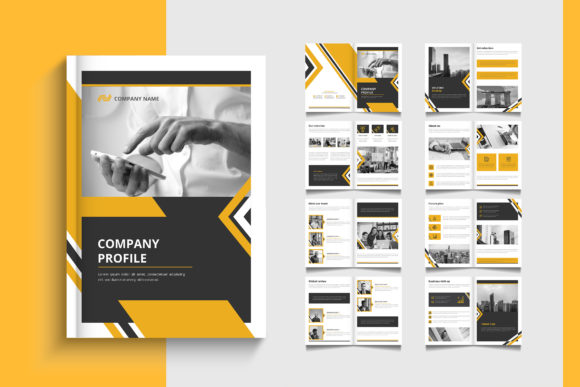
Presenting your business in a polished, professional manner is crucial for making a strong first impression. A well-designed Pages Company Profile, Brochure Template provides the perfect foundation for creating a cohesive and impactful suite of documents. This versatile template is crafted to be used for any business purpose, whether you're developing a comprehensive company profile, a sleek brochure, a detailed report, a persuasive proposal, or even a formal white paper or prospectus. Its clean, modern design ensures your content stands out with clarity and sophistication.
Designed for Versatility and Ease of Use
One of the greatest strengths of this template is its adaptability. It functions as a complete design asset, allowing you to maintain consistent branding across multiple touchpoints. The standard A4 size with a 3mm bleed makes it print-ready, while the CMYK color mode ensures accurate color reproduction. Because it's 100% editable, you have full control to customize every element to align with your brand identity.
The template is provided in multiple formats to fit your workflow:
- Ai and EPS files with 8 different artboards, offering a range of layout options for your projects.
- A PDF file for easy viewing and sharing.
- A Help File with documentation to guide you through customization.
- Links to free fonts used in the design, so you can achieve the exact look without extra cost.
Practical Applications for Creative Projects
Think of this template as a toolkit for professional communication. It's ideal for designers and business owners who need to create high-quality materials efficiently. Use it to develop:
- Brand Collateral: Design a unified look for your company profile, capability statement, and internal reports.
- Marketing Materials: Craft compelling brochures, prospectuses, and proposal documents that win clients.
- Editorial Layouts: Structure white papers, annual reports, or magazine-style booklets with a professional flow.
- Digital and Print Projects: The clean typography and layout work beautifully for both online presentations and printed booklets.
Tips for Choosing and Using a Template Effectively
When selecting a design template, consider how it will support your content. Check the readability of the text elements and ensure the overall mood matches your project's tone—whether it's corporate, creative, or technical. A key advantage of a well-structured template is its font pairing; this one uses free, complementary typefaces that establish clear visual hierarchy and modern typography.
Before finalizing, review all available artboards and styles within the file to choose the best starting point for your layout. Always verify that the license for the template and any included fonts covers your intended use, especially for commercial projects. Investing in a quality template like this saves significant time and elevates the professional presentation of your work, strengthening brand recognition through consistent, high-quality design.
Choosing a thoughtfully designed template is a practical step toward creating documents that are not only informative but also visually engaging. It ensures your business communications look polished and credible, helping you make a memorable impact on your audience.