Jobie Admin: Streamline Your Hiring with a Modern Dashboard UI
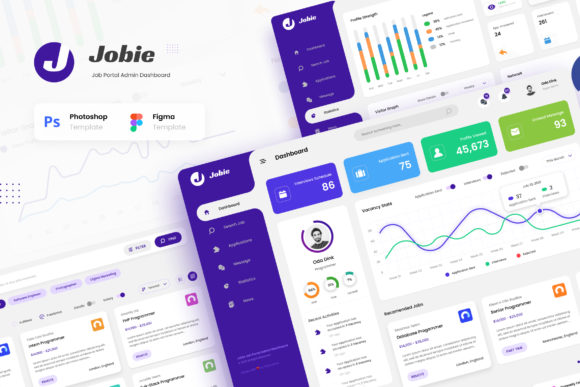
Managing a modern recruitment process demands more than just a list of applicants; it requires a clear, efficient, and visually engaging command center. The Jobie Admin - Portal Dashboard UI Design template delivers exactly that, offering a sleek, contemporary interface tailored for the fast-paced world of talent acquisition. This design asset is crafted for creators building platforms where clarity and functionality are paramount, transforming complex data into an intuitive visual experience.
This template is an ideal design asset for anyone developing a job portal app, a dedicated hiring manager tool, a freelancer platform, or a comprehensive career services website. Its strength lies in its versatility and polished modern typography, which sets a professional tone from the first glance. The clean sans serif font choices used throughout ensure readability across dense data tables and profile cards alike, embodying the principles of effective web design for functional applications.
Creative Flexibility for Any Job-Focused Project
The value of a well-structured UI kit extends far beyond its initial screens. Imagine using the cohesive visual language from Jobie Admin to inform the brand identity of your entire platform. The consistent use of color, spacing, and type can guide the creation of social media graphics for marketing campaigns, or even the packaging design for any physical onboarding kits you might send to new hires. The design’s inherent clarity makes it suitable for editorial design in recruitment blogs or internal company newsletters, ensuring a unified look across all touchpoints.
For designers, this template acts as a robust foundation. It includes six meticulously crafted screens: a comprehensive Dashboard, a powerful Search Job interface, a detailed Applications manager, a user Profile section, a Companies directory, and insightful Statistics. Each screen is built at a standard 1920px width, providing ample space for detailed content while maintaining a responsive feel. The fact that it utilizes FREE fonts from Google Font means you can implement the exact typeface pairing without additional licensing costs, a crucial consideration for startups and independent developers.
Tips for Customizing Your Dashboard Template
To make the most of this resource, consider these practical steps during your UI design process:
- Match the Mood: The template’s modern, clean aesthetic is perfect for tech and corporate sectors. If your platform targets creative fields, you might introduce a more expressive display font for headlines while keeping the body text in the original sans serif for readability.
- Test Font Pairings: Experiment with combining the provided fonts with a subtle serif font for quotes or secondary information to add visual hierarchy without compromising the clean interface.
- Leverage the Structure: Use the well-documented layers and groups in the PSD and Figma files to easily edit and customize elements. The organized structure allows you to quickly adapt the color scheme to match your own brand identity.
- Focus on Consistency: Apply the design system’s buttons, cards, and navigation patterns consistently. This builds user trust and makes your application feel more professional and reliable.
Choosing the right UI template is about finding a balance between aesthetic appeal and practical utility. The Jobie Admin template provides a stunning visual framework that doesn’t sacrifice functionality. Its premium feel comes from thoughtful details—well-spaced layouts, clear iconography, and a harmonious color palette—that make complex data feel approachable. By starting with a strong, well-designed foundation, you can accelerate your development timeline and focus your creative energy on the unique features that will set your platform apart. This is more than just a font download or a set of screens; it’s a comprehensive toolkit for building a polished, professional experience in the competitive landscape of digital recruitment.